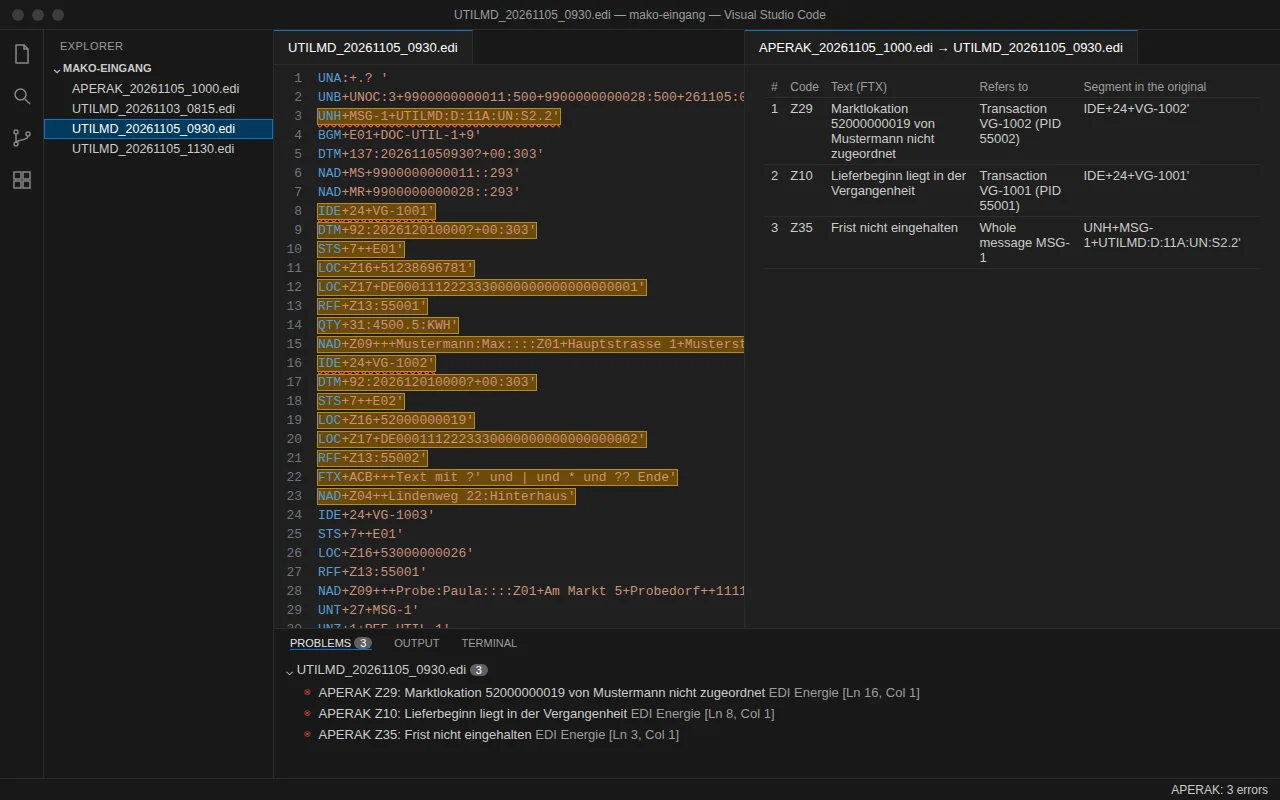
Why was my UTILMD rejected? Each APERAK error, at its place in the original message.
For Marktkommunikation teams at Stadtwerke, grid operators and suppliers, and the IT providers they escalate to. Open the APERAK or the CONTRL in VS Code: Pro finds the message it rejects in the folder and marks each error at its transaction, segment and data element. The free version already names the message type, the format version and the Prüfidentifikator of every transaction, and warns when a format version was not in force.
- Messages never leave your machine
- MaLo-IDs stay in-house
- German, English and French interface
How it works
Three steps, no account, no message leaves your machine.
- InstallInstall EDI Reader Energie from the Marketplace or Open VSX. EDI Reader, the EDIFACT viewer it is built on, is installed with it.
- Open a messageOpen a UTILMD, MSCONS, APERAK or CONTRL: the message type, the format version and the Prüfidentifikator are in the status bar and on hover. A format version that was not in force on the date of the message gives a warning.
- Open the rejectionOn an APERAK or a CONTRL, a line above the message counts its errors. With Pro, “EDI Energie: Show the APERAK/CONTRL errors in the original message (Pro)” opens the original message with each error marked.
What the extension does
A reader for MaKo messages, not a converter and not a validator against the AHB: it shows what a message contains and what an APERAK or a CONTRL refers to, and it never changes your files.
Each rejection in the original message (Pro)
Pro finds the original message in the folder and opens it; each APERAK and CONTRL error is marked at its transaction, segment and data element, next to the original message and in the Problems view.
Message type, version, Prüfidentifikator
Recognises UTILMD, MSCONS, APERAK, CONTRL, INVOIC, REMADV and other MaKo messages: message type, format version and Prüfidentifikator of each transaction, in the status bar and on hover.
Format version not in force
Warning when a message uses a format version that was not in force on its date (built-in table from BNetzA Mitteilung Nr. 56 and, for CONTRL, the BDEW MIG; extendable in Settings).
Rejection report (Pro)
Rejection report for a folder: by day, Prüfidentifikator, error code and market partner; CSV and HTML.
Compare two messages (Pro)
MaKo comparison of two messages, transaction by transaction (transaction ID and Prüfidentifikator).
Anonymised copy for your service provider (Pro)
Anonymised copy for your service provider: MaLo-IDs (check digit kept correct), MeLo-IDs and other location IDs, names, addresses and references replaced consistently, also between a message and its APERAK.
Your own lists
Your own Prüfidentifikator and error-code lists shown on hover: the free “Anwendungsübersicht der Prüfidentifikatoren” (xlsx, downloaded by you from bdew-mako.de) is read as it is; error codes come from your own csv with the columns “Code” and “Beschreibung”. No BDEW content is built in.
EDI Reader Pro included
Includes EDI Reader Pro, with no second purchase and no second key: structure check (mandatory segments, segment counts, references), CSV/JSON export, folder checks and HTML report in EDI Reader.
100% local
Your messages and lists never leave this machine: the only network call is the licence check. Activation needs one connection to api.gumroad.com (through your VS Code proxy settings); after that, Pro works offline. No telemetry.
Free, and Pro when you need it
The free version reads and recognises every MaKo message, with no time limit and no account, and already tells you how many errors, differences and rejections there are. Pro takes you to them. Yearly subscription, cancel any time.
Free
No time limit, no account.
- Everything in EDI Reader (free), installed with it: every EDIFACT segment named, hover, Inspector, Outline
- Recognises UTILMD, MSCONS, APERAK, CONTRL, INVOIC, REMADV and other MaKo messages: message type, format version and Prüfidentifikator of each transaction, in the status bar and on hover
- Warning when a message uses a format version that was not in force on its date (built-in table from BNetzA Mitteilung Nr. 56 and, for CONTRL, the BDEW MIG; extendable in Settings)
- Your own Prüfidentifikator and error-code lists shown on hover: the free “Anwendungsübersicht der Prüfidentifikatoren” (xlsx, downloaded by you from bdew-mako.de) is read as it is; error codes come from your own csv with the columns “Code” and “Beschreibung”. No BDEW content is built in
- APERAK and CONTRL: number of errors, error codes, and whether the original message was found in the folder
- Already before you buy: how many differences two messages have, how many values anonymising would replace and how many rejections a folder holds
- German, English and French interface; 100% local
- Each error marked in the original message
- Rejection report of a folder
- Comparison and anonymised copy
Energie Pro
One key for one person, on up to 5 machines. Yearly subscription.
- Everything in the free version
- Pro finds the original message in the folder and opens it; each APERAK and CONTRL error is marked at its transaction, segment and data element, next to the original message and in the Problems view
- Rejection report for a folder: by day, Prüfidentifikator, error code and market partner; CSV and HTML
- MaKo comparison of two messages, transaction by transaction (transaction ID and Prüfidentifikator)
- Anonymised copy for your service provider: MaLo-IDs (check digit kept correct), MeLo-IDs and other location IDs, names, addresses and references replaced consistently, also between a message and its APERAK
- Includes EDI Reader Pro, with no second purchase and no second key: structure check (mandatory segments, segment counts, references), CSV/JSON export, folder checks and HTML report in EDI Reader
- Works offline once activated
Refund within 14 days of each payment. Payment, invoice and VAT handled by Gumroad, merchant of record.
Frequently asked questions
Are my messages sent anywhere?
Your messages and lists never leave this machine: the only network call is the licence check. Activation needs one connection to api.gumroad.com (through your VS Code proxy settings); after that, Pro works offline. No telemetry. The licence check carries the key and the product identifier, never a message, a list or their content.
Does it check my messages against the AHB or the MIG?
Not affiliated with BDEW, EDI@Energy or BNetzA. EDI Reader Energie shows what a message contains and what an APERAK or CONTRL refers to; it does not check messages against the AHB. It recognises the message type, the format version and the Prüfidentifikator, and it shows where each APERAK or CONTRL error points in the original message.
Which messages are recognised?
Recognises UTILMD, MSCONS, APERAK, CONTRL, INVOIC, REMADV and other MaKo messages: message type, format version and Prüfidentifikator of each transaction, in the status bar and on hover. Warning when a message uses a format version that was not in force on its date (built-in table from BNetzA Mitteilung Nr. 56 and, for CONTRL, the BDEW MIG; extendable in Settings).
What is the difference between free and Pro?
Free recognises every MaKo message, warns about a format version not in force, counts the errors of an APERAK or a CONTRL and says whether the original message is in the folder, and counts the differences between two messages and the rejections of a folder. Pro opens the original with each error marked, writes the rejection report (CSV, HTML), shows the comparison transaction by transaction, makes the anonymised copy, and includes EDI Reader Pro.
What is not covered?
Not covered in this version: checks against the AHB or MIG (EDI Reader Energie shows what a message contains and what an APERAK or CONTRL refers to; it does not check messages against BDEW rules); built-in labels for Prüfidentifikatoren and APERAK codes (load your own list; no APERAK error-code list is published as a spreadsheet, so write a csv with the columns “Code” and “Beschreibung”); MIG/AHB XML files; format versions of INVOIC, REMADV and other types (add them in Settings); sending or receiving messages; the generic EDI Reader tree and hover are in English or French. Limits: files over 8 MB are not read, also with Pro; a search or a report counts them as not read and says the original message may be one of them. The search for an original message reads at most 2,000 files (closest modification date first). A rejection report reads at most 20,000 files (newest first) and gives the number of files it did not read.
On how many machines can I use my key?
One key for one person, on up to 5 machines. A machine is counted the first time the key is activated in a VS Code installation: a new computer, VS Code reinstalled with its data erased, or a non-persistent virtual desktop whose identifier changes. Entering the key again, trying again after a network error, removing and re-entering it on the same installation, or updating the extension uses nothing. New computer or VS Code reinstalled? Write to support@novair.app with your purchase e-mail and we reset the count.
How does the subscription work?
Yearly subscription through Gumroad: cancel any time from Gumroad or by writing to support@novair.app; Pro stays active until the end of the paid year. Refund within 14 days of each payment, no questions asked, at support@novair.app.
Can I get an invoice, with or without VAT?
The price is EUR 82.50 per year + VAT where applicable; Gumroad, merchant of record, shows the exact amount for your country at checkout. Need an invoice? Use the “Generate” link at the bottom of your Gumroad receipt: enter your name and business address, add what your accounts need under “Additional notes”, and download the PDF. An EU business that paid VAT can enter its VAT number there: Gumroad refunds the VAT and the invoice shows no VAT. Gumroad cannot change an invoice afterwards.
What about updates?
Updates come through your extension store (VS Code Marketplace or Open VSX) and are included while your subscription runs; a later version never takes away what your subscription unlocks.
My company network blocks Gumroad. What happens?
Activation needs one connection to api.gumroad.com, through your VS Code proxy settings. If it cannot get through, the free version keeps working, and you can ask for a refund within 14 days at support@novair.app.